Managing meets
Running a meet in Gym TeamHub — meet types and qualifying badges, the roster with per-apparatus toggles, sessions, sign-ups, documents, and coach notes.
Everything for one meet lives on its detail page — who's competing, the session schedule, parent sign-ups, shared documents, and the staff's own coach notes.
Creating a meet
Create a meet with dates, location, and details. Meet Type matters: Regular Meet, State Championship, Regional Championship, National Championship, or Non-Sanctioned decides which qualifying badges show up in Scores. At a regular meet, a score at or above your State qualifying score for the gymnast's level earns a State badge. The same goes for Regionals at a State Championship and for Nationals at a Regional Championship. National Championships and Non-Sanctioned meets earn none. Enter a sanctioned invitational as a Regular Meet.
Cost and Payment due are free text, shown just as you type them. Families see both on the meet's card until the meet is over, each cut to one line, so keep them short ("$150", "March 3"); the meet itself shows the full text.
The roster
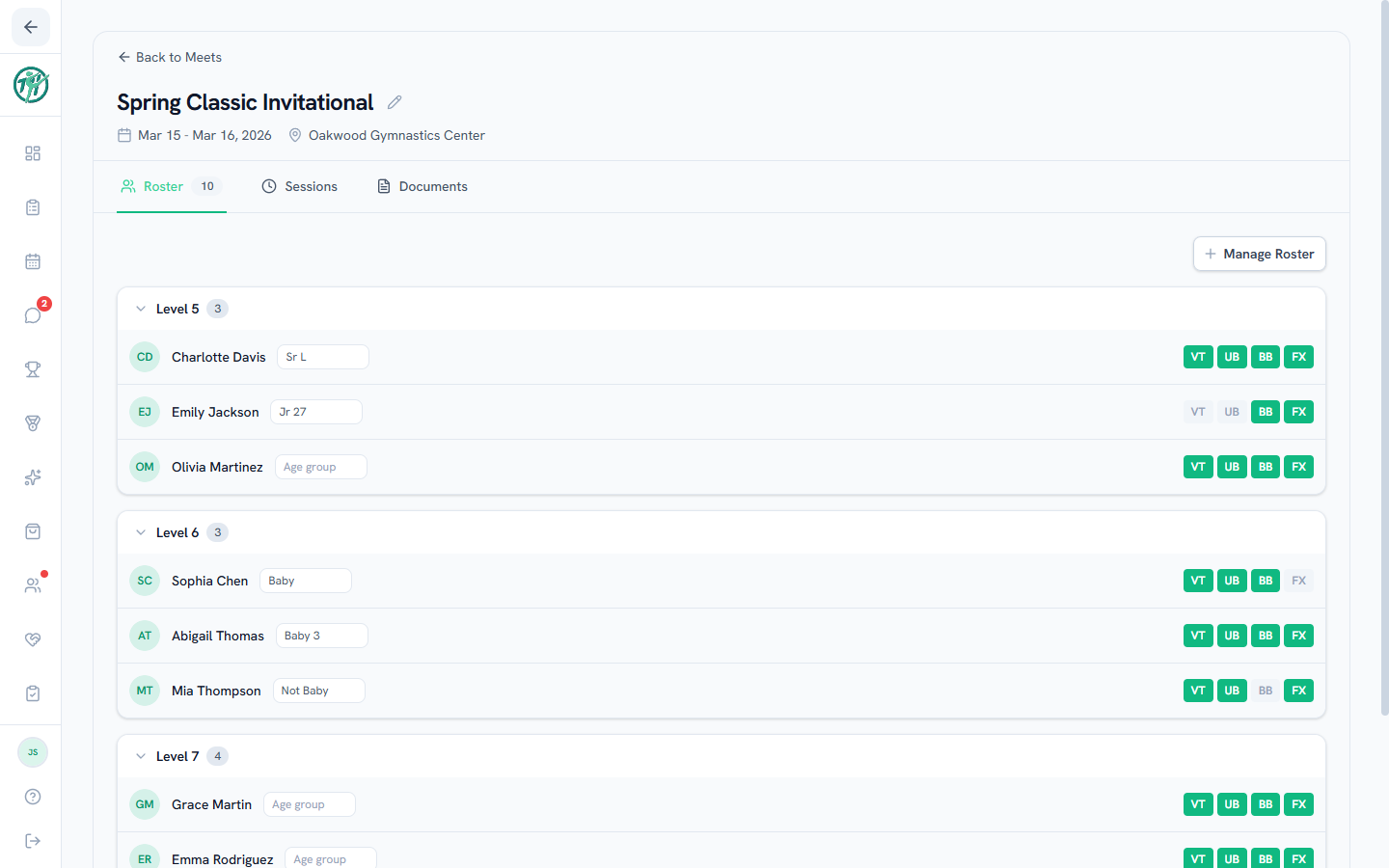
Manage Roster adds or removes gymnasts. It lists your active gymnasts, plus anyone already on this roster who has since been paused or retired — marked Paused or Retired, so you can take them off. Only active gymnasts can be added. Each gymnast you check also gets a level dropdown — that's the level they compete at for this meet. Nothing is written until you press Save Roster. Then each roster row carries a toggle per apparatus — highlighted means competing at this meet — and an age-group box that saves automatically, no save button. The roster groups by level.
Adding a gymnast tells their family: each guardian with an account gets one notification naming the meet and their gymnast, by first name. Taking a gymnast off puts a line in the guardians' notification list and sends no push. Nobody is notified about a meet that has already ended, about a paused or retired gymnast, or about a change they made themselves.
To put one gymnast on several rosters at once, use Add to a meet or camp on the Meets & Camps card of their profile.
The meet level is deliberately separate from the gymnast's current level on their profile. A meet keeps the level they competed at then, so moving someone up mid-season never rewrites finished meets or re-files their old scores. If a gymnast changed level between signing up and competing, fix just that meet in Manage Roster — the roster, the sessions, and any scores already entered for it all move together, and other meets are untouched.
Sessions
Sessions split the meet into competing groups, each with its own name, date, check-in time, assigned coaches, and gymnast list. Manage gymnasts lists the meet roster by level — check a whole level or pick individually, and anyone already placed in another session drops off the list, so nobody gets double-booked.
Sign-ups
Turn on parent sign-ups (in Edit) and requests land on the Sign-ups tab in first-come order with each gymnast's level — promote them onto the roster in one click. Once there is more than one, you can re-sort by level or last name, which helps when you are grouping gymnasts into sessions. The number beside each name stays their place in the sign-up queue whichever sort you pick, so it reads out of order under level or name. That is deliberate — it answers "who signed up first", which is the question that matters when a meet has a cap.
Documents
Share the meet packet, session schedule, venue maps, and any other files with families — everything for the weekend in one place.
Coach Notes
A staff-only notice board for the meet: travel plans, meet logistics, performance notes, anything the coaches should know that families shouldn't see. Owners, directors and coaches can post, comment, pin and react; admins, parents and athletes never see the tab. See Coach Notes.
Tip
Creating a meet-type calendar event also creates the Meets & Camps record automatically — one entry, both places. See Creating events.
Last updated October 4, 2026
New to Gym TeamHub?
One organized hub for your whole gymnastics program — built by a coach.
Start Your Gym