Coach Notes
Staff-only notes on a meet or camp — post, comment, pin and react, with alerts you can mute per meet. Owners, directors and coaches only.
Coach Notes is a private notice board on every meet and camp, for the coaching staff only. Use it for anything the staff should know that families shouldn't see: travel plans, warm-up order, who to keep an eye on, what to tell the judges' table.
Only owners, directors and coaches see it. Admins, parents and athletes never do — the tab doesn't appear for them, and they can't open it from a link. The tab itself says so: Only owners, directors and coaches can see Coach Notes.
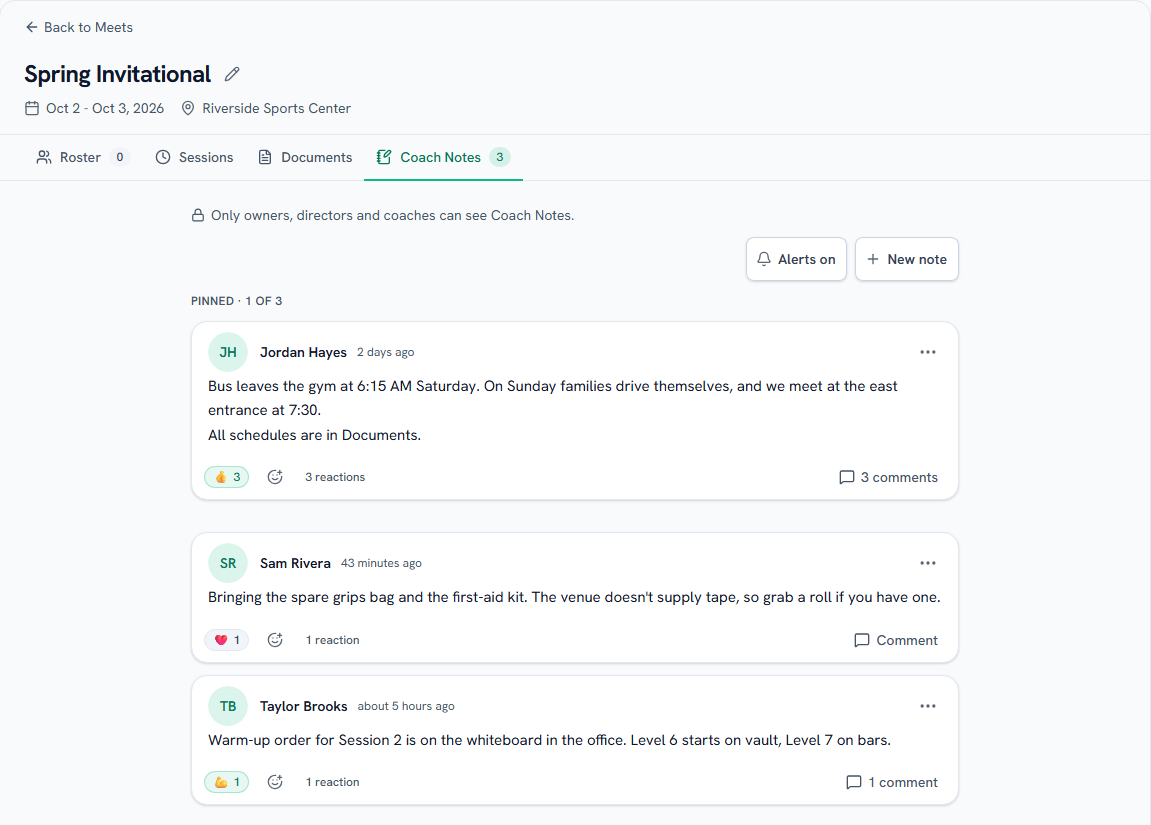
Posting a note
- Open the meet or camp from Meets & Camps.
- Choose the Coach Notes tab (on the mobile app it's called Notes). The number on the tab is how many notes there are.
- Choose New note, write your note, and choose Post.
Notes are text only, up to 5,000 characters, and links are clickable. The newest note is at the top. Each note shows who posted it and when — tap or click the time to see the exact date and time.
If a post doesn't go through, your text stays in the box so you can try again.
Comments and reactions
- Comments: choose Comment under a note (it reads 2 comments once there are some) to read the replies and add your own. Comments are one level deep — you reply to the note, not to another comment — and can be up to 2,000 characters.
- Reactions: add one of the app's eight emoji reactions to a note. You get one reaction per note: choose the same one again to remove it, or a different one to switch. Choose N reactions to see who reacted with what.
Pinning
Pin the notes everyone needs to see first. Open a note's ⋯ menu and choose Pin. Pinned notes sit at the top under a Pinned · 2 of 3 label.
- Any owner, director or coach can pin or unpin any note.
- A meet or camp can have 3 pinned notes. Unpin one before pinning another.
Editing and deleting
- Edit: only the person who wrote a note or comment can edit it — a note from its ⋯ menu, a comment with the Edit link under it. It then shows Edited.
- Delete: the person who wrote it can delete it, and so can an owner or director — from the note's ⋯ menu, or the Delete link under a comment. You'll be asked to confirm, and deleting a note deletes its comments with it. Deleting can't be undone.
Owners & directors
Owners and directors can delete anyone's note or comment — useful for tidying up, or removing something that shouldn't have been posted. Editing stays with the author.
Alerts
Here's who hears about a post:
- A new note alerts every other owner, director and coach in your gym.
- A new comment alerts the note's author and everyone who commented on it before.
- Reactions, pins, edits and deletes send nothing.
An alert never includes what was written. It says who posted and where — "Casey Coach posted a note on State Championships" — because a push notification can sit on a lock screen, and notes often mention gymnasts by name. Tap the alert to open that meet straight on its notes. Opening the tab clears that meet's alerts.
Two ways to turn them down:
- Mute one meet or camp: the bell at the top of the tab reads Alerts on. Tap or click it to switch it to Muted, and you won't get alerts for that meet or camp at all. Tap it again to turn them back on. It only affects you.
- Turn them all off: switch off Coach notes in your notification settings — on the web, the gear in the notification bell's panel; in the app, Settings → Notifications. The tab then says Coach note alerts are off in Settings. See Privacy and notifications.
On the mobile app
Everything above works in the app, on the Notes tab of a meet or camp. Writing or editing a note opens a sheet, and a note's comments open in their own sheet with the note at the top.
Note
Not the same as a gymnast's coach notes. The Skills page has a coach notes column for notes about one gymnast on one event, and Progress Reports have a coach notes section. Coach Notes on a meet are a separate, staff-only conversation about that meet or camp.
Common questions
Can parents or admins see Coach Notes?
No. Only owners, directors and coaches can open the tab or read a note. That includes alerts: admins, parents and athletes never get one.
What happens to the notes after the meet?
They stay. Notes aren't locked or cleared when a meet ends, so next season's staff can look back at what worked. Pinning, commenting and reacting keep working too.
What happens if we delete the meet?
The notes go with it. When an owner or director deletes a meet or camp, the confirmation says how many coach notes will be deleted along with it.
What if our subscription lapses?
While your gym is view-only, everyone who could read Coach Notes still can. Nothing can change until the subscription is back: no posting, commenting, editing, pinning or reacting — and, unlike some other parts of the app, no deleting either. The bell to mute a meet keeps working, because it's your own setting.
Who is "Former staff"?
A note or comment keeps its author's name. If that person leaves your gym or their account is deleted, the note stays and shows Former staff instead.
Last updated September 22, 2026
New to Gym TeamHub?
One organized hub for your whole gymnastics program — built by a coach.
Start Your Gym